For the Egyptian Tax Authority (ETA) system

E-invoices and e-receipts, in one app

Issue invoices and receipts to the Egyptian Tax Authority and follow them until they're accepted, from your phone or your computer. We set up your connection to ETA; you start issuing straight away.

Runs on Android Windows Linux

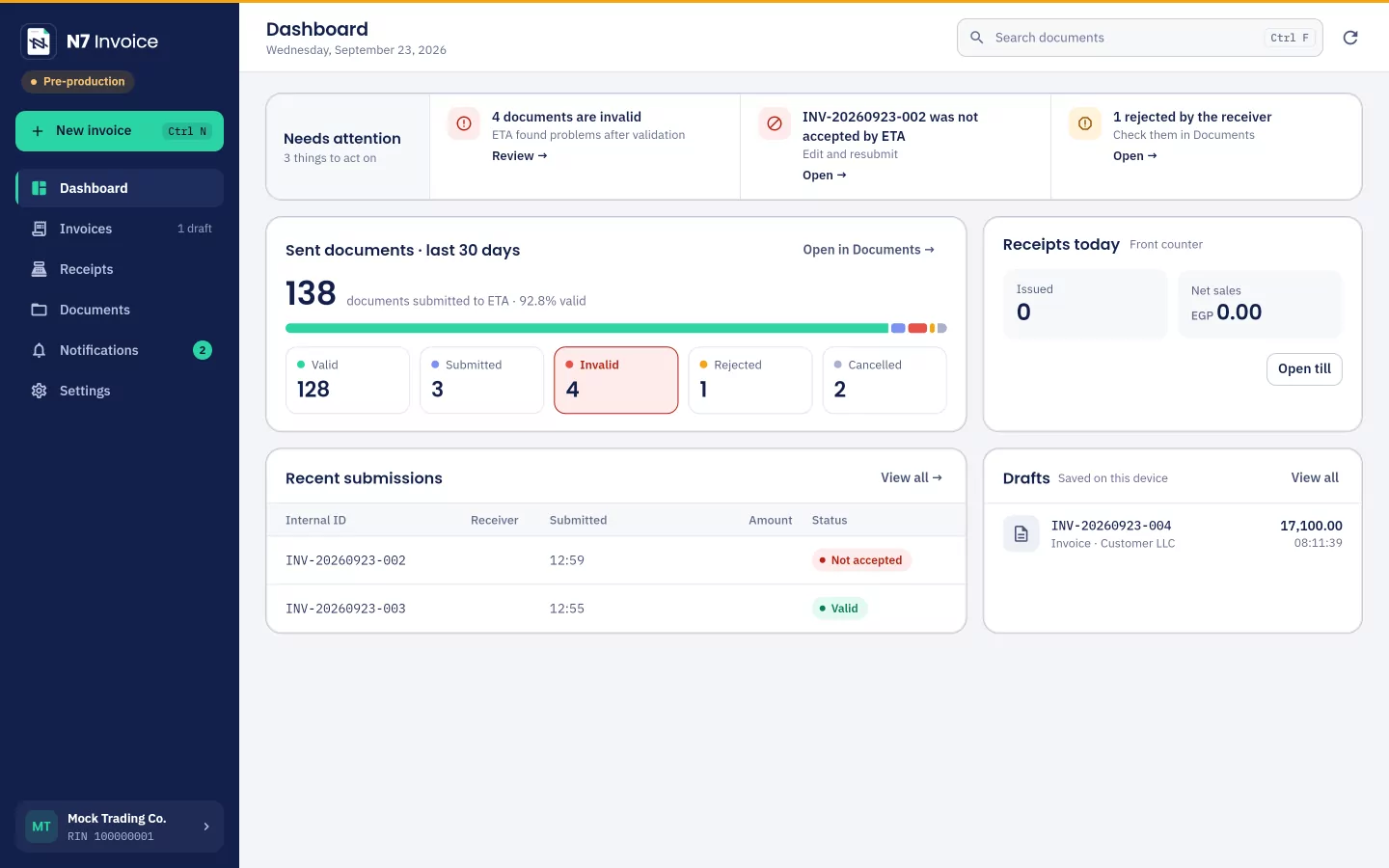
The N7 Invoice dashboard on a computer: documents issued in the last 30 days and their status at ETA, and today's receipts
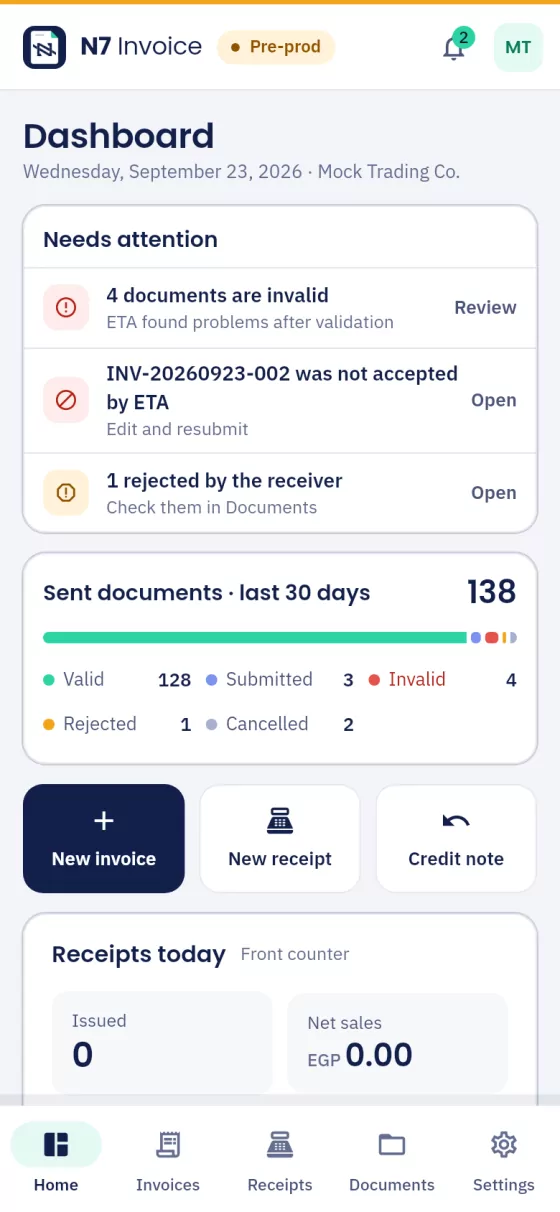
N7 Invoice on a phone: the dashboard and what needs attention
Versions 0.9 and 1.0with eSeal digital signing
All 23 receipt typessales and returns, every activity
Android, Windows, Linuxphone, tablet and computer
Arabic and Englishthe app and ETA's messages

Invoices for your business customers, receipts for consumers

One licence covers invoices, receipts or both, depending on your business.

Selling to companies and agencies

E-invoice

Invoices, credit and debit notes and export invoices, sent to ETA from the app and followed until they're accepted.

  • Checked against ETA's rules as you type
  • Version 1.0 signed with your eSeal or in the cloud
  • Credit or debit notes from the invoice itself
  • Search your sent and received documents
More about e-invoices
Selling to consumers

E-receipt

For every sale to a consumer in your shop or restaurant: a receipt printed with its verification code and sent to ETA automatically.

  • A point of sale with your products, categories and sizes
  • Prints on 80 mm rolls or A4 paper
  • Sent in the background within the 24-hour window
  • Returns, and corrections of what ETA rejects
More about the point of sale

For businesses

Connect, sign and send. Effortlessly.

Solutions that save your company time: shared cloud signing, invoices signed and sent from your phone, a link to your own systems, and invoices delivered to your customers on WhatsApp automatically.

Shared cloud signing

No need to keep the signing token with you. One signature for your company, used by all your approved devices through the cloud.

Sign and send from your phone

Review an invoice on your phone, then sign it and send it to ETA, signed, from wherever you are.

Connect your ERP or POS

Link your current system to the app: invoices go out automatically without you, or pick the ones you want and send them in one click.

Invoices to your customers on WhatsApp

Your customer gets the invoice on WhatsApp automatically as soon as it's issued, with the PDF and its verification link.

E-invoice

A correct invoice before you press Send

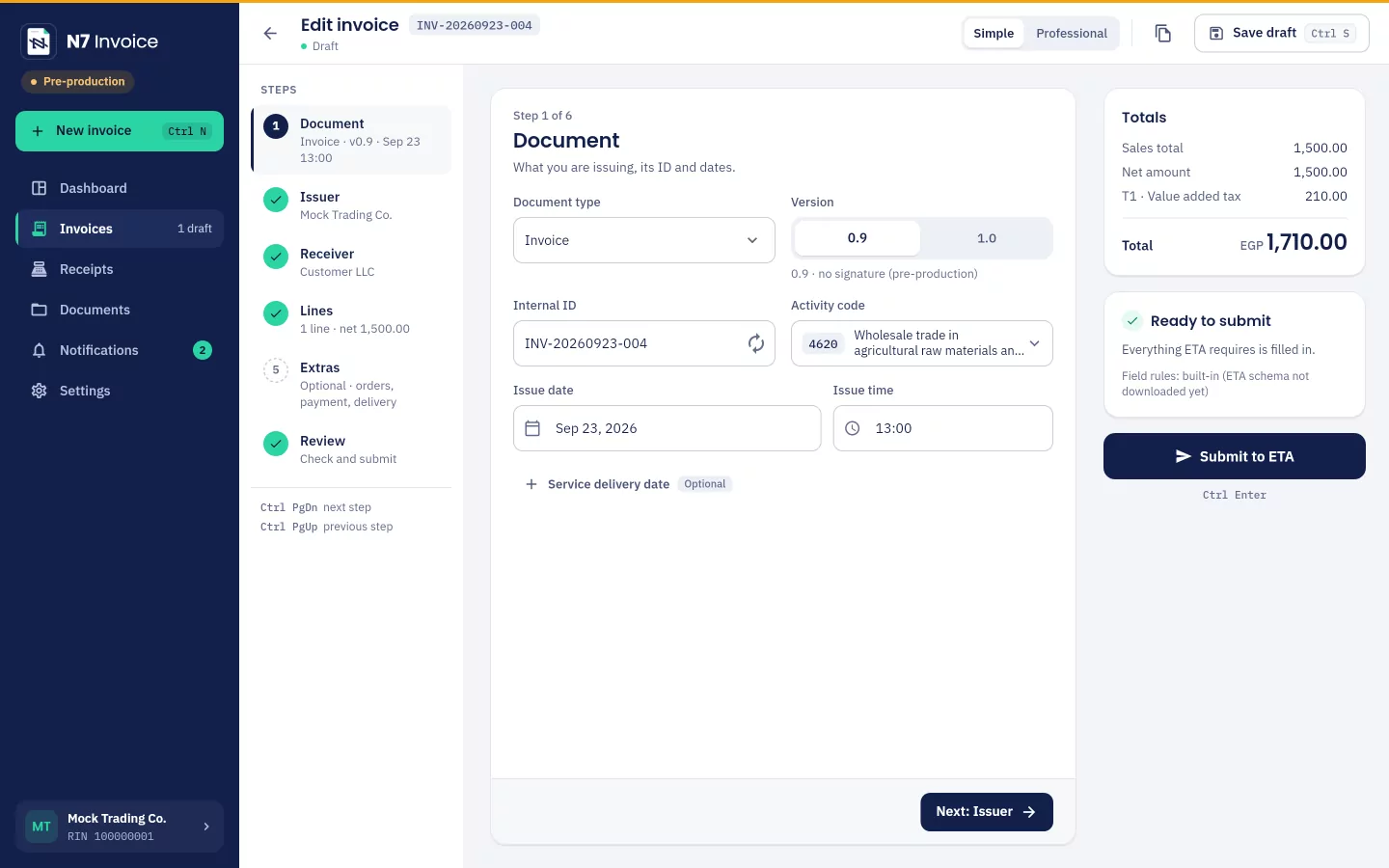
The app checks every field as you type against ETA's rules, calculations and code tables. The review step lists what's left to fix, each problem one tap away from its field.

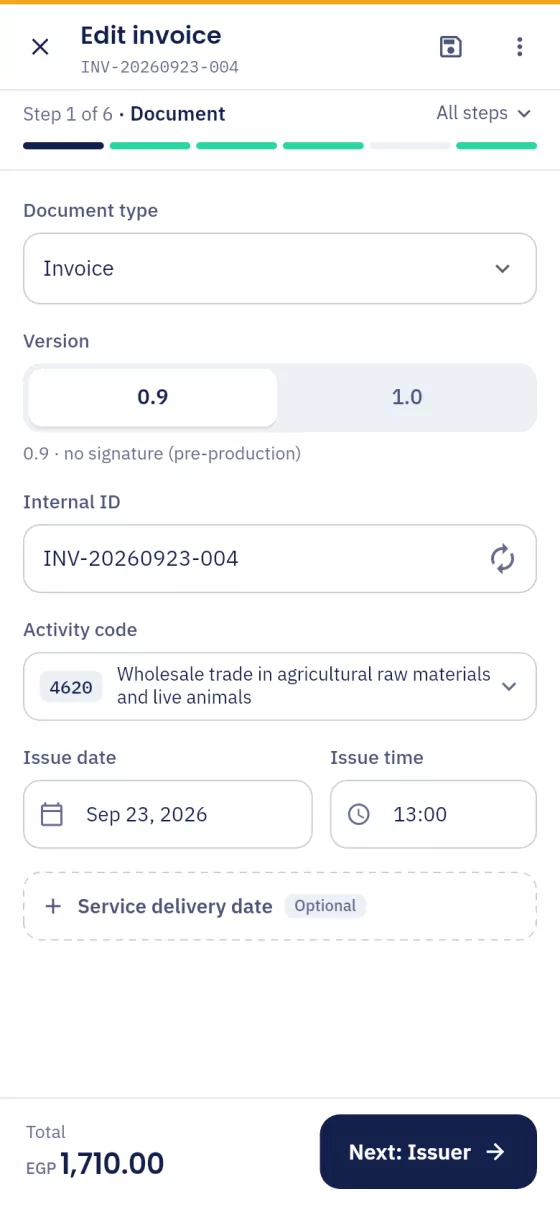
The invoice editor in simple mode: the steps, the document step and the totals with Ready to send
The invoice editor on a phone in simple mode, one step at a time

Simple or professional

Steps with only the required fields, or every field on one page.

Version 1.0 signing

With your eSeal on the computer, or with cloud signing from any device, your phone included.

Drafts any time

Save it unfinished and complete it later, or on another device.

Import from Excel

A whole CSV file becomes drafts you submit together.

E-receipt and point of sale

Tap to sell. The receipt sends itself.

Your products on screen as tiles, in your own categories. Tap a product or scan its barcode, print the receipt with its verification code, and the app sends it to ETA in the background within the 24-hour window.

Sizes and variants

A burger in small, medium and large, each at its own price.

Printed with its code

80 mm roll or A4, with the QR code that verifies the receipt.

Barcode and quick search

By name, code or barcode; Enter adds the product.

Returns and corrections

Return a past sale, or correct a receipt ETA rejected.

For every activity: coffee shops and restaurants, retail, general and professional services, transportation, education, entertainment and more.

Features

Everything you need to work with ETA every day

From sending and tracking to imports and syncing between your devices.

Followed until accepted

The app submits each document, shows ETA's rejections at once and follows it until it's valid; the dashboard shows what needs your attention.

Sent and received documents

Search and filter, print the PDF, cancel or reject what ETA allows, and issue a credit note from an invoice.

CSV import and export

For invoices, receipts, products and item codes, with ready templates in Arabic and English.

Sync between your devices

The same customers, drafts, receipts and products on every device in your company, with a local copy on each.

Item codes (EGS)

Request your item codes from ETA from one sheet, with new codes numbered for you.

ETA notifications

Know as soon as a supplier sends you a document, or a document you sent is rejected.

How to start

Start in three steps

We handle the technical setup with ETA; you start issuing.

  1. 1

    Request a licence

    Tell us what you need: invoices, receipts or both, and how many devices, through the form or WhatsApp.

  2. 2

    We prepare your account

    We add your ETA connection, POS devices and company details to your licence, so you never type a secret yourself.

  3. 3

    Activate and start

    Install the app and enter the serial number; your details reach the device over an encrypted, signed connection.

Want to try first? We can set up a private test environment for your company before you send anything to ETA.

On your phone and your computer

Download the app for Android, Windows or Linux and activate it with the serial number we send you. The same app works in Arabic and English.

Download page
Android Phones and tablets, Android 7 or later
Windows Windows 10 and 11, 64-bit
Linux .deb package for Ubuntu 24.04 or later

FAQ

Before you start

Didn't find your answer? Message us on WhatsApp.

Do I have to type my ETA connection details?

No. We add your ERP credentials (client ID and secret) and your POS devices to your licence. They reach the app when you activate it, over an encrypted connection, and are kept in your device's secure keyring.

Does the app work offline?

The app checks its licence every time it starts, so it needs the internet when you open it. After that, receipts are issued and printed at once, and the app sends them to ETA in the background within the 24-hour window.

What do I need to sign invoices (version 1.0)?

Either your eSeal on its USB token, plugged into a Windows or Linux computer, or shared cloud signing, so you can sign from any device, your phone included, without the token.

Can I try it before sending real documents?

Yes. The app can run on a private test environment for your company, or on ETA's pre-production environment, before you move to production.

How many devices can I use?

As many as your licence covers. Every device is activated with the same serial number, and you can ask for more devices or move the licence from one device to another.

Where is my data kept?

On your device. Cloud sync is optional: when it's on, your customers, drafts, receipts and products are kept in your N7 account so every device in your company sees them.

Request a licence

Request a licence and we'll handle the rest

Send us your details and we'll contact you to work out what fits your business and set up your account. No technical setup needed on your side.

After you send the request

  1. We contact you by phone or WhatsApp to understand what you need.
  2. We prepare your licence and your ETA connection.
  3. You receive your serial number, install the app and start.

Your details

Fields marked optional can be left empty.

What you need

We only use your details to contact you about your request.